library(tidyverse)
library(tidymodels)

dat <- read_csv("SurveyMeasurements.csv")

dat |>
  ggplot(aes(x = `height (inches)`, y = `right handspan (cm)`)) +
  geom_point() +
  labs(
    x = "Height (inches)",
    y = "Right handspan (cm)"
  )
“Those who ignore Statistics are condemned to reinvent it.” - Brad Efron
The independent variables that appear in a linear model can be one of two types: quantitative and qualitative (or categorical).
The different values of an independent variable used in regression are called its levels.
For a quantitative variable, the levels correspond to the numerical values it assumes. For example, if the number of defects in a product ranges from 0 to 3, the independent variable assumes four levels: 0, 1, 2, and 3.
The levels of a qualitative variable are not numerical. They can be defined only by describing them. Thus, they are the categories to which an observation can belong.
Thus far, we have only considered predictor variables that are quantitative.
Qualitative predictor variables can also be used in regression models.
Let’s look at an example involving handspans and heights of students.
Example 15.1
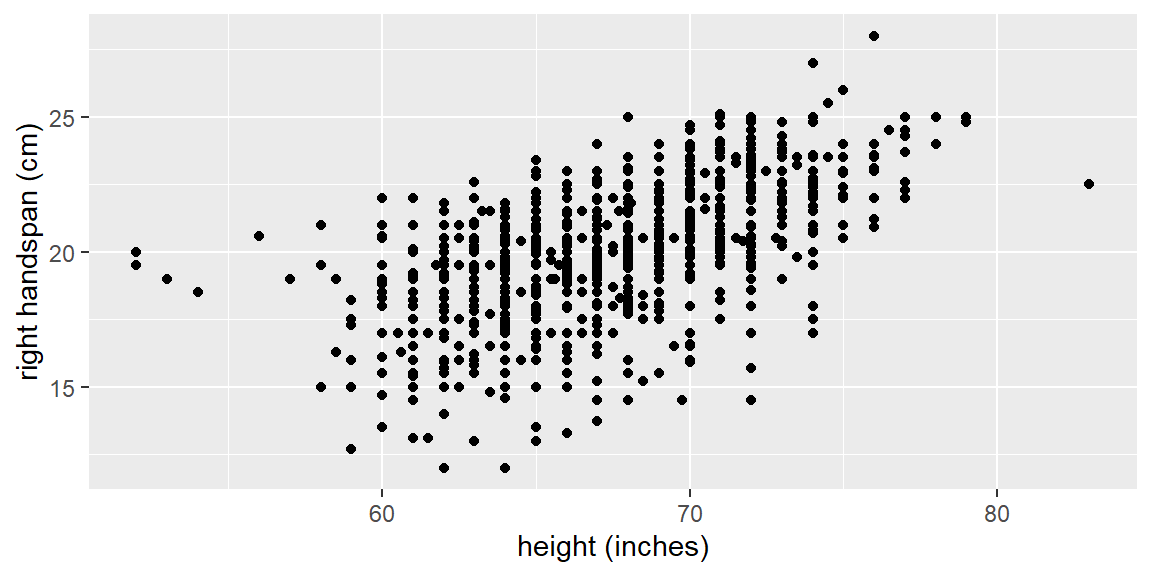
The dataset examined here consists of left and right hand spans of 1102 students along with height, sex, handedness, and dominant eye. The response variable is right hand span with height as a predictor variable. Below is a scatterplot of the data.
library(tidyverse)
library(tidymodels)
dat <- read_csv("SurveyMeasurements.csv")
dat |>
ggplot(aes(x = `height (inches)`, y = `right handspan (cm)`)) +
geom_point() +
labs(
x = "Height (inches)",
y = "Right handspan (cm)"
)
Let’s now take into account sex. We can color code males and females in the plot and see if there is a discernible difference. We will also fit separate simple linear regression models to each sex.
dat |>
  filter(!is.na(sex)) |>
  ggplot(aes(x = `height (inches)`, y = `right handspan (cm)`,
             color = sex)) +
  geom_point() +
  geom_smooth(method = "lm", se = FALSE) +
  labs(
    x = "Height (inches)",
    y = "Right handspan (cm)",
    color = "Sex"
  )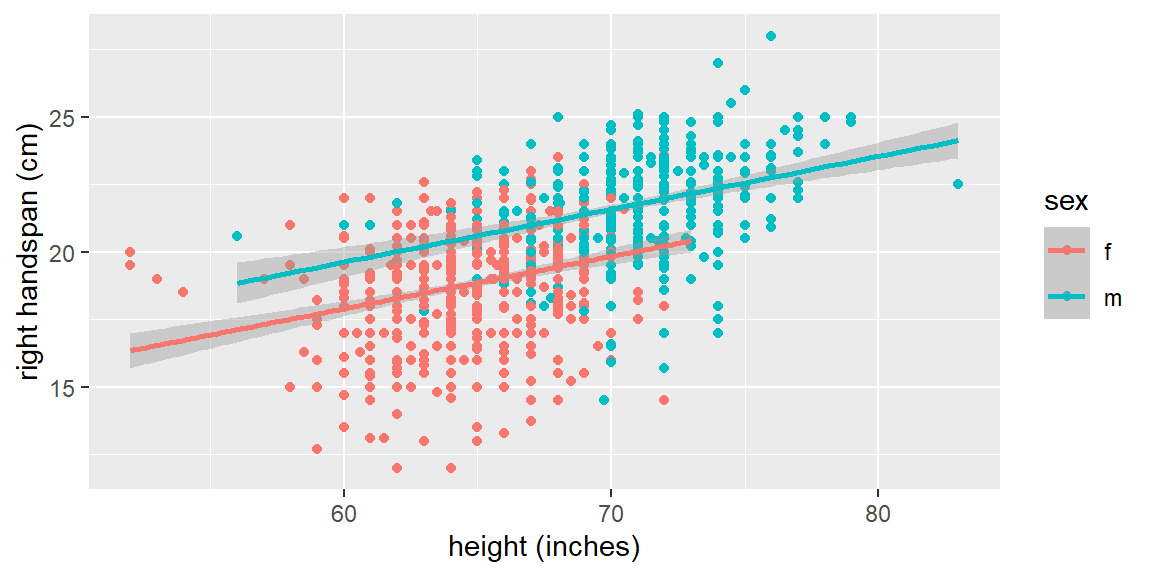
We can see that sex plays a role in the regression line. For the male subjects, the fitted line tends to be higher than for the female subjects.
We will include the qualitative variables in our model by using indicator variables.
An indicator variable (or dummy variable) takes on the values of 0 and 1. For example, a model for the handspan data is \[ \begin{align*} y_{i} & =\beta_{0}+\beta_{1}x_{i1}+\beta_{2}x_{i2}+\varepsilon \end{align*} \] where \[ \begin{align*} y & =\text{ handspan}\\ x_{1} & =\text{ height}\\ x_{2} & =\begin{cases} 1 & \text{ if sex=M}\\ 0 & \text{ otherwise} \end{cases} \end{align*} \]
If the subject is male, then the expectation becomes \[ \begin{align*} E\left[y_{i}\right] & =\beta_{0}+\beta_{1}x_{i1}+\beta_{2}\left(1\right)\\ & {=\left(\beta_{0}+\beta_{2}\right)+\beta_{1}x_{i1}} \end{align*} \] If the subject is female, the expectation is \[ \begin{align*} E\left[y_{i}\right] & =\beta_{0}+\beta_{1}x_{i1}+\beta_{2}\left(0\right)\\ & {=\beta_{0}+\beta_{1}x_{i1}} \end{align*} \]
Thus, the two groups will have the same slope (\(\beta_{1}\)), but will have different intercepts. That means the means of the two groups are different by \(\beta_{2}\) for all values of \(x_{1}\).
We could also have different slopes for the two groups by incorporating an interaction term between the predictors.
The model above allows the groups to have different intercepts, but it assumes they have the same slope. That means the difference between the groups is the same for every value of the quantitative predictor.
To allow both the intercept and the slope to differ, we can include an interaction between the quantitative predictor and the indicator variable:
\[ \begin{align*} y_i = \beta_0+\beta_1x_i+\beta_2z_i+\beta_3x_iz_i+\varepsilon_i, \end{align*} \]
where \(z_i=1\) for one group and \(z_i=0\) for the reference group.
For the reference group, \(z_i=0\), so
\[ \begin{align*} E(y_i)=\beta_0+\beta_1x_i. \end{align*} \]
For the other group, \(z_i=1\), so
\[ \begin{align*} E(y_i)=(\beta_0+\beta_2)+(\beta_1+\beta_3)x_i. \end{align*} \]
The coefficient \(\beta_2\) changes the intercept, while \(\beta_3\) changes the slope. In this model, the group difference depends on the value of \(x\).
Suppose female is the reference group and the fitted model is
\[ \widehat{y}=b_0+b_1(\text{height})+b_2(\text{male}). \]
Then the fitted equations are
| Group | Indicator value | Fitted equation |
|---|---|---|
| Female | 0 | \(\widehat{y}=b_0+b_1(\text{height})\) |
| Male | 1 | \(\widehat{y}=(b_0+b_2)+b_1(\text{height})\) |
The coefficient \(b_2\) is the estimated difference between males and females at the same height. Because there is no interaction term, the model assumes this difference is constant across all heights.
The plot in Example 15.1 included separate fitted lines for each sex. To fit that idea directly, we can include an interaction between height and sex.
| term | estimate | std.error | statistic | p.value |
|---|---|---|---|---|
| (Intercept) | 6.2735 | 1.5573 | 4.0285 | 0.0001 |
height (inches) |
0.1938 | 0.0240 | 8.0767 | 0.0000 |
| sexm | 1.6051 | 2.5156 | 0.6381 | 0.5236 |
height (inches):sexm |
0.0020 | 0.0369 | 0.0546 | 0.9564 |
In this model, the interaction term estimates how much the height slope differs between the non-reference group and the reference group. If the interaction coefficient is near 0, then the separate fitted lines are close to parallel. If it is far from 0, then the relationship between height and handspan differs by group.
Example 15.2
Indicator variables can be specified with the step_dummy() function. You can tell it which variable to make into indicator variables. If we want all character variables to be turned into indicator variables, we can specify all_nominal_predictors().
# Prepare data
handspan_recipe <- recipe(
  `right handspan (cm)` ~ `height (inches)` + sex,
  data = dat
) |>
  step_naomit() |>
  step_dummy(all_nominal_predictors())

# Set up model
lm_model <- linear_reg() |>
  set_engine("lm")

# Set up the workflow
handspan_workflow <- workflow() |>
  add_recipe(handspan_recipe) |>
  add_model(lm_model)

# Fit the model
handspan_fit <- handspan_workflow |>
  fit(data = dat)

handspan_fit |>
  tidy() |>
knitr::kable(digits = 4)| term | estimate | std.error | statistic | p.value |
|---|---|---|---|---|
| (Intercept) | 6.2182 | 1.1827 | 5.2576 | 0 |
height (inches) |
0.1947 | 0.0182 | 10.6900 | 0 |
| sex_m | 1.7422 | 0.1546 | 11.2721 | 0 |
Note that the variable sex has an m next to it. This is letting you know which category (level) is encoded with 1. The way this is determined in step_dummy() is based on which level comes first in alphabetical order. For the sex variable, f is first, so it is the reference level. The reference level is the 0 in the encoding.
The fitted model can be used to compare two students at the same height. The following table compares the predicted right handspan for a female student and a male student who are both 70 inches tall.
same_height_predictions <- tibble(
  `height (inches)` = c(70, 70),
  sex = c("f", "m")
)

same_height_results <- predict(
  handspan_fit,
  new_data = same_height_predictions
) |>
  bind_cols(same_height_predictions) |>
  select(sex, `height (inches)`, predicted_handspan_cm = .pred)

same_height_results |>
knitr::kable(digits = 3)| sex | height (inches) | predicted_handspan_cm |
|---|---|---|
| f | 70 | 19.844 |
| m | 70 | 21.587 |
The difference between these two predictions is the fitted male indicator coefficient because the two students have the same value of height.
If we want to change the reference level to another category, we can use the step_relevel() function first.
# Prepare data
handspan_recipe_m_reference <- recipe(
  `right handspan (cm)` ~ `height (inches)` + sex,
  data = dat
) |>
  step_naomit() |>
  step_relevel(sex, ref_level = "m") |>
  step_dummy(all_nominal_predictors())

# Set up model
lm_model <- linear_reg() |>
  set_engine("lm")

# Set up the workflow
handspan_workflow_m_reference <- workflow() |>
  add_recipe(handspan_recipe_m_reference) |>
  add_model(lm_model)

# Fit the model
handspan_fit_m_reference <- handspan_workflow_m_reference |>
  fit(data = dat)

handspan_fit_m_reference |>
  tidy() |>
knitr::kable(digits = 4)| term | estimate | std.error | statistic | p.value |
|---|---|---|---|---|
| (Intercept) | 7.9605 | 1.2870 | 6.1854 | 0 |
height (inches) |
0.1947 | 0.0182 | 10.6900 | 0 |
| sex_f | -1.7422 | 0.1546 | -11.2721 | 0 |
Note that the coefficient for height did not change and the coefficient for sex changed signs but had the same magnitude. Changing the reference level changes the way the difference is described, but it does not change the fitted values from the model.
We can verify that the fitted values are unchanged by comparing predictions from the two models. The first model uses f as the reference level, while the second model uses m as the reference level.
reference_check_data <- tibble(
  `height (inches)` = c(65, 65, 70, 70),
  sex = c("f", "m", "f", "m")
)

female_reference_predictions <- predict(
  handspan_fit,
  new_data = reference_check_data
) |>
  rename(predicted_with_f_reference = .pred)

male_reference_predictions <- predict(
  handspan_fit_m_reference,
  new_data = reference_check_data
) |>
  rename(predicted_with_m_reference = .pred)

bind_cols(
  reference_check_data,
  female_reference_predictions,
  male_reference_predictions
) |>
  mutate(difference = predicted_with_f_reference - predicted_with_m_reference) |>
knitr::kable(digits = 6)| height (inches) | sex | predicted_with_f_reference | predicted_with_m_reference | difference |
|---|---|---|---|---|
| 65 | f | 18.87112 | 18.87112 | 0 |
| 65 | m | 20.61335 | 20.61335 | 0 |
| 70 | f | 19.84442 | 19.84442 | 0 |
| 70 | m | 21.58665 | 21.58665 | 0 |
The predictions are the same. Only the baseline used to describe the coefficients changed.
We can use indicator variables for qualitative predictors that have more than two classes (categories).
For example, suppose we wanted to model the sales price of a home based on the quantitative predictors lot size (\(x_1\)), local taxes (\(x_2\)), and age (\(x_3\)).
We may also want to include the qualitative predictor for air conditioning type. The possible classes are “no air conditioning”, “window units”, “heat pumps”, and “central air conditioning”.
We will now set up the indicator variables in the following way: \[ \begin{align*} x_{4} & =\begin{cases} 1 & \text{ if no air conditioning}\\ 0 & \text{ otherwise } \end{cases}\\ x_{5} & =\begin{cases} 1 & \text{ if window units}\\ 0 & \text{ otherwise } \end{cases}\\ x_{6} & =\begin{cases} 1 & \text{ if heat pumps}\\ 0 & \text{ otherwise } \end{cases} \end{align*} \] We do not include an indicator variable for the last class “central air conditioning” because subjects with \(x_{4}=0\), \(x_{5}=0\), and \(x_{6}=0\) will be considered in the class “central air conditioning”.
As a general rule, if there are \(c\) classes for a qualitative variable, then \(c-1\) indicator variables will be needed.
If a qualitative predictor has \(c\) classes and the model includes an intercept, we include only \(c-1\) indicator variables. The omitted class becomes the reference group.
Including all \(c\) indicators along with an intercept creates perfect multicollinearity because the indicators add up to 1 for every observation. This is sometimes called the dummy variable trap.
The expectations become \[ \begin{align*} \text{no air conditioning: }E\left[y_{i}\right]= & \beta_{0}+\beta_{1}x_{i1}+\beta_{2}x_{i2}+\beta_{3}x_{i3}+\beta_{4}\left(1\right)+\beta_{5}\left(0\right)+\beta_{6}\left(0\right)\\ = & \left(\beta_{0}+\beta_{4}\right)+\beta_{1}x_{i1}+\beta_{2}x_{i2}+\beta_{3}x_{i3} \end{align*} \] \[ \begin{align*} \text{window units: }E\left[y_{i}\right]= & \beta_{0}+\beta_{1}x_{i1}+\beta_{2}x_{i2}+\beta_{3}x_{i3}+\beta_{4}\left(0\right)+\beta_{5}\left(1\right)+\beta_{6}\left(0\right)\\ = & \left(\beta_{0}+\beta_{5}\right)+\beta_{1}x_{i1}+\beta_{2}x_{i2}+\beta_{3}x_{i3} \end{align*} \] \[ \begin{align*} \text{heat pumps: }E\left[y_{i}\right]= & \beta_{0}+\beta_{1}x_{i1}+\beta_{2}x_{i2}+\beta_{3}x_{i3}+\beta_{4}\left(0\right)+\beta_{5}\left(0\right)+\beta_{6}\left(1\right)\\ = & \left(\beta_{0}+\beta_{6}\right)+\beta_{1}x_{i1}+\beta_{2}x_{i2}+\beta_{3}x_{i3} \end{align*} \] \[ \begin{align*} \text{central air conditioning: }E\left[y_{i}\right]= & \beta_{0}+\beta_{1}x_{i1}+\beta_{2}x_{i2}+\beta_{3}x_{i3}+\beta_{4}\left(0\right)+\beta_{5}\left(0\right)+\beta_{6}\left(0\right)\\ = & \beta_{0}+\beta_{1}x_{i1}+\beta_{2}x_{i2}+\beta_{3}x_{i3} \end{align*} \]
So once again the slopes will be the same for each class but the intercept will change for different classes.
Suppose a model predicts exam score from hours studied and course format. The course format has four categories:
Use “in person” as the reference level.
online asynchronous indicator mean?Since there are 4 categories, we need \(4-1=3\) indicator variables.
One possible coding is
\[ x_2 = \begin{cases} 1 & \text{if hybrid}\\ 0 & \text{otherwise} \end{cases} \]
\[ x_3 = \begin{cases} 1 & \text{if online synchronous}\\ 0 & \text{otherwise} \end{cases} \]
\[ x_4 = \begin{cases} 1 & \text{if online asynchronous}\\ 0 & \text{otherwise} \end{cases} \]
In-person classes have \(x_2=0\), \(x_3=0\), and \(x_4=0\).
The coefficient for online asynchronous is the estimated difference in mean exam score between online asynchronous and in-person classes, holding hours studied constant.
Example 15.3
Let’s examine the CDI data from Kutner1. The data consist of the number of active physicians (\(Y\)), the population size, total personal income, and region of 440 counties in the United States.
The region variable is originally coded in the dataset as
| Code | Region |
|---|---|
| 1 | New England |
| 2 | North Central |
| 3 | Southern |
| 4 | Western |
Note that when you read this into R, the region codes are treated as numeric values rather than factors or characters. If they are passed to the lm engine this way, they are treated like any other quantitative variable.
We can use the step_num2factor() function to convert these to factors. We can even change the names from the numbers to the name of the region by passing this function a vector of names (in the order of the numbers).
| region | region_name | n |
|---|---|---|
| 1 | New England | 103 |
| 2 | North Central | 108 |
| 3 | Southern | 152 |
| 4 | Western | 77 |
# Prepare data
cdi_recipe <- recipe(
  num_physicians ~ pop + personal_income + region,
  data = cdi_dat
) |>
  step_num2factor(region, levels = region_names) |>
  step_dummy(all_nominal_predictors())

# Set up model
lm_model <- linear_reg() |>
  set_engine("lm")

# Set up the workflow
cdi_workflow <- workflow() |>
  add_recipe(cdi_recipe) |>
  add_model(lm_model)

# Fit the model
cdi_fit <- cdi_workflow |>
  fit(data = cdi_dat)

cdi_fit |>
  tidy() |>
knitr::kable(digits = 4)| term | estimate | std.error | statistic | p.value |
|---|---|---|---|---|
| (Intercept) | -58.4762 | 58.8161 | -0.9942 | 0.3207 |
| pop | 0.0006 | 0.0003 | 1.9449 | 0.0524 |
| personal_income | 0.1070 | 0.0133 | 8.0733 | 0.0000 |
| region_North.Central | -3.4931 | 78.8104 | -0.0443 | 0.9647 |
| region_Southern | 42.1967 | 74.0226 | 0.5701 | 0.5689 |
| region_Western | -149.0196 | 86.8332 | -1.7162 | 0.0868 |
The step_num2factor() step is important because the region numbers are labels, not measurements. Region 4 is not “twice as much region” as region 2.
Note that we did not have to use step_dummy() here after the numbers were turned into factors by step_num2factor(). The lm engine automatically turns factors into dummy variables for you. In fact, the engine will turn any character predictor into dummy variables. However, it is good practice to include step_dummy() in your recipe when dealing with qualitative variables since it allows for more control when dealing with complex data.
In this chapter, we extended regression models to include qualitative predictors by using indicator variables.
| Idea | Meaning |
|---|---|
| Quantitative predictor | A predictor whose values are numerical measurements or counts. |
| Qualitative predictor | A predictor whose values are categories or groups. |
| Level | A possible value or category of a predictor. |
| Indicator variable | A variable coded as 0 or 1 to represent whether an observation belongs to a particular category. |
| Reference level | The category represented by all 0s for the indicator variables. Coefficients for other categories are interpreted relative to this group. Changing the reference level changes coefficient interpretation but not fitted values. |
| Two-class predictor | A qualitative predictor with two categories needs one indicator variable. |
| More than two classes | A qualitative predictor with \(c\) categories needs \(c-1\) indicator variables when the model includes an intercept. |
| Dummy variable trap | Perfect multicollinearity created by including all \(c\) indicators along with an intercept. |
| Same-slope indicator model | A model with indicator variables but no interactions; the groups have different intercepts but the same slope for the quantitative predictor. |
| Interaction term | A product term that allows the relationship between a quantitative predictor and the response to differ by group. |
| Different-slope indicator model | A model with an indicator variable, a quantitative predictor, and their interaction; groups may have different intercepts and different slopes. |
| Coded categories | Numeric labels such as 1, 2, 3, and 4 should be converted to factors when the numbers represent categories rather than quantities. |
What is the difference between a quantitative predictor and a qualitative predictor?
Why do we need indicator variables to include qualitative predictors in a regression model?
Suppose female is the reference level and male is coded as 1. What does the coefficient for the male indicator represent?
Why does a qualitative predictor with four categories require only three indicator variables when the model includes an intercept?
What is the dummy variable trap?
If changing the reference level changes the sign of an indicator coefficient, does it change the fitted values from the model? Explain.
Why should a region variable coded as 1, 2, 3, and 4 usually be converted to a factor before fitting a regression model?
In a model with height and sex but no interaction, what assumption is being made about the slope for height across sex groups?
In the model \(E(y)=\beta_0+\beta_1x+\beta_2z+\beta_3xz\), where \(z\) is an indicator variable, what does \(\beta_3\) represent?
Why is it useful to compare predictions from two models that use different reference levels?
Quantitative predictors are numerical measurements; qualitative predictors are categories. Height, income, and population size are quantitative. Sex, region, and air-conditioning type are qualitative.
Regression models need numerical inputs. Indicator variables translate categories into 0/1 variables so the model can estimate separate mean shifts for different groups.
It is the estimated difference from the reference group. If female is the reference level, the male coefficient estimates how much higher or lower the mean response is for males than for females at the same value of the other predictors.
The omitted group is represented by the intercept. With four categories, three indicators identify three of the groups. The fourth group is the reference level, where all three indicators equal 0.
It is perfect multicollinearity from overcoding categories. If all category indicators are included along with an intercept, the indicators add to 1 for every observation. One column is therefore perfectly determined by the others.
No. Changing the reference level changes which group is used as the baseline and changes how coefficients are described, but the model’s fitted values remain the same.
The numbers are labels, not amounts. Treating region as numeric would imply that region 4 is larger than region 3 and that the spacing between regions is meaningful. Converting it to a factor tells the model to treat the values as categories.
The height slope is assumed to be the same for each group. The indicator changes the intercept, but without an interaction term, the model assumes the relationship between height and handspan has the same slope for both sex groups.
It is the difference in slopes. The reference group has slope \(\beta_1\). The group with \(z=1\) has slope \(\beta_1+\beta_3\). So \(\beta_3\) describes how much the slope changes for the non-reference group.
It separates coefficient interpretation from fitted values. Changing the reference level changes the baseline group and therefore the coefficient signs/names, but it should not change the predictions. Comparing fitted values makes that invariance visible.
Kutner, M. H., Nachtsheim, C. J., Neter, J., & Li, W. (2004). Applied Linear Statistical Models. McGraw-Hill/Irwin series operations and decision sciences.↩︎